
Tuesday, April 04, 2006
Colour Scheme generator
This site has a neat colour scheme generator for making web pages, but also has other uses as well. You pick a colour and it gives you other colours to go with your choice. It gives many options such as contrast, monochromatic,pastel, dark pastel, contrast and pale. It even has a way of viewing them for different types colour blindness.

Repair a scratched CD/DVD
Here is a great tip to repair (at least long enough to copy the data) a scratched CD or DVD. Check the comments section on this link, there are a couple of other good ideas in there too.
Thursday, March 16, 2006
Google in space

Google isn't out to dominate the world... it's too confining! check out Google mars and Google Moon . They show surface imagery and mark landing sites and more.
It's the Google maps for space travellers.
Friday, March 10, 2006
Snazzy flash web gallery stuff
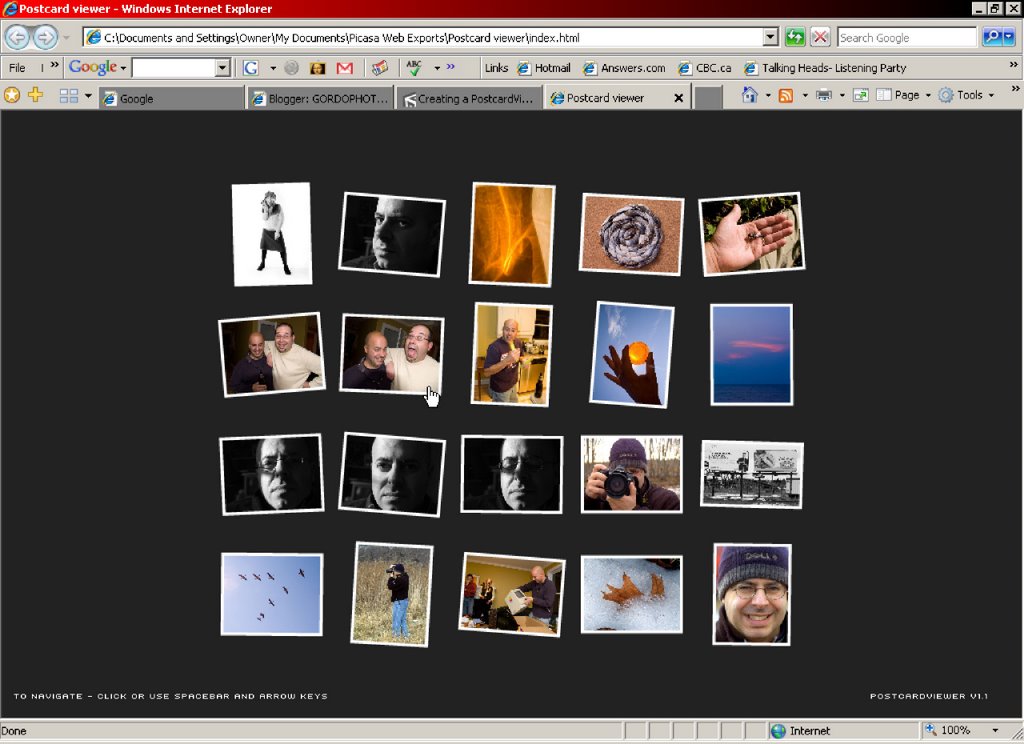
Felix Turner at Airtight interactive has a couple of nifty Flash based web galleries one called Simpleviewer and the other Postcard viewer. Both galleries have various ways to plug into imaging software like Picasa, iPhoto and a very quick and cool little app called Porta. The postcard viewier now offers a script that is compatible with Photoshop CS2. Give'm a try!
Wednesday, March 08, 2006
Too cool! Lego Camera

I know, this is a digital photo blog but if you want to "kick it, old-school" you might as well have fun with Lego as well : Thoughts About Photography: 35mm Lego Camera
Now, I'm off to raid my son's box of lego!
ashes and snow

I came across this website ashes and snow and was blown away by both the images and the presentation. It's the work of Canadian photographer Gregory Colbert. Here is a link to an article about it on the Christian Science Monitor website.

Monday, March 06, 2006
Home Improvement
It's been over a month since my last post, sorry for that, but I have been a busy fellow lately (with lots of help). Our home has been undergoing an "extreme makeover". New flooring, windows, some paint and an air exchanger with HEPA filtration. All this is to make our home much healthier for the whole family. It took much research to find suitable materials due to my multiple chemical sensitivities, but it was worth it, I have had very few issues with most of the improvements so far. The carpets simply had to go, they were so old they caused me no problems in terms of off-gassing but were becoming a big problem with my wife and son who have asthma and allergies. We have gotten a lot done, but there is much more work to go.
This weekend we finally got the living room put back together and we are very pleased with the new look. Through all of this the orchid Nannette received on her 40th birthday last summer has been blooming. I have been wanting to photograph it since she got it but I never really got inspired until tonight when it was placed into it's new environment and the time seemed right to capture it's beauty. Perhaps it's a symbol of our home blossoming into a healthy, happy, habitat.

Orchid Blooms
This weekend we finally got the living room put back together and we are very pleased with the new look. Through all of this the orchid Nannette received on her 40th birthday last summer has been blooming. I have been wanting to photograph it since she got it but I never really got inspired until tonight when it was placed into it's new environment and the time seemed right to capture it's beauty. Perhaps it's a symbol of our home blossoming into a healthy, happy, habitat.
Orchid Blooms
Wednesday, February 22, 2006
Tip: Camera Raw setting subsets
I have a 'knockout' tip posted on my buddy Rob's blog using Camera raw subsets. Check it out here :
http://photoshop2.blogspot.com/2006/02/save-settings-subset-in-camera-raw.html also check out some of the other great stuff he has there.
Thursday, February 02, 2006
Nifty add-on, reveal in Bridge
Check out this link from the Bridge Developers Blog to download a file (Win and Mac versions) that add a new "Reveal in Bridge" command to Windows Explorer's or Apple Finder's contextual menu. Nifty!
http://blogs.adobe.com/bridge/2006/01/reveal_in_bridg.html
http://blogs.adobe.com/bridge/2006/01/reveal_in_bridg.html
Tip, Customize keyboard shortcuts

Is there a tool or function in Photoshop that you use frequently but doesnt have a keyboard shortcut or one that is hard to remember? In CS and CS2 there is a keyboard shortcut manager. Look under Edit/Keyboard Shortcuts ... you can add, change or remove shortcuts for Application Menus, Palette Menus and Tools.
For instance, the shortcut for Image/Adjustments/Curves is CTRL+M, you can reassign that shortcut to Layer/Adjustment Layer/Curves, so now the shortcut will give you a curve adjustment layer instead. A great timesaver.
If you are not already using adjustment layers for things like Curves, Levels, or Hue/Saturation, I recommend you do. An adjustment layer is non-destructive and you can double-click the adjustment layer and re-adjust your settings, also the opacity settings can be used to fade the affect. The other nice thing about the adjustment layer is that it automatically gives you a layer mask which you can paint in burning and dodging without permanently altering the image. The adjustment layer can be dragged and dropped onto another image requiring the same or similar adjustment. Another great timesaver!
Friday, January 27, 2006
Photo D.I.Y.
Here is a site that has a number of Do-it-yourself projects for photographers ranging from homemade flash diffusers, film scanners and a macro lens from a pringles can. http://www.photocritic.org/ great projects for the Hi-tech redneck.
Tuesday, January 24, 2006
I'm stumped
Here are a couple of images taken this past weekend at an orchard near my friend Rob's home in Fredericton.

applestump I

applestump II
applestump I
applestump II
Subscribe to:
Posts (Atom)